Project: Cybersecurity Lab Network Architecture
Building an isolated Virtual Private Network (VPN) environment for security analysis, active directory triage, and penetration testing using VMware Workstation Pro.
System Engineering & Security Logs
A running historical archive of network modifications, lab deployments, and configuration changes.
Task Classification
Category: Virtual Network Architecture
Scope: TCM Security SOC 101 Lab Baseline
Status: ● Deployed & Verified
Local Host: Windows 10
Hypervisor: VMware Workstation
Target Segment: 192.168.1.0/24
Engineering Actions Taken
-
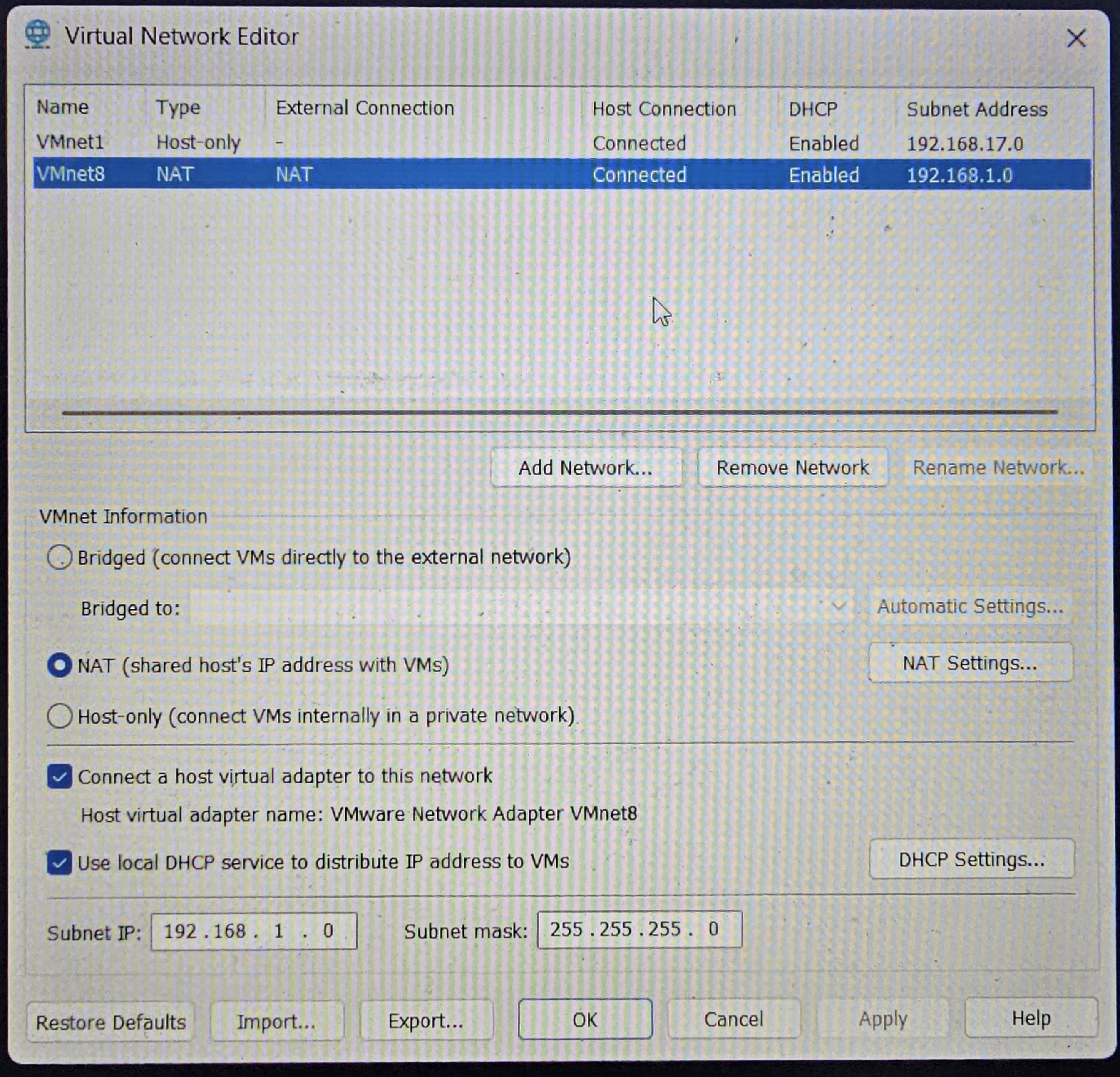
Hypervisor Analysis: Evaluated VMware Workstation's global networking rules. Confirmed a software restriction limiting the hypervisor environment to a single active Network Address Translation (NAT) interface, pre-allocated to
VMnet8. -
Subnet Restructuring: Re-opened the Virtual Network Editor with elevated administrative permissions. Selected the primary
VMnet8routing interface and modified the default IP scope from192.168.88.0to the course-required network target identifier:192.168.1.0. -
DHCP Allocation Tuning: Fixed a subnet masking syntax conflict by switching the network root identity from a static host address (
.10) to the network boundary number (.0), utilizing a255.255.255.0mask (/24) to enable dynamic IP addressing. -
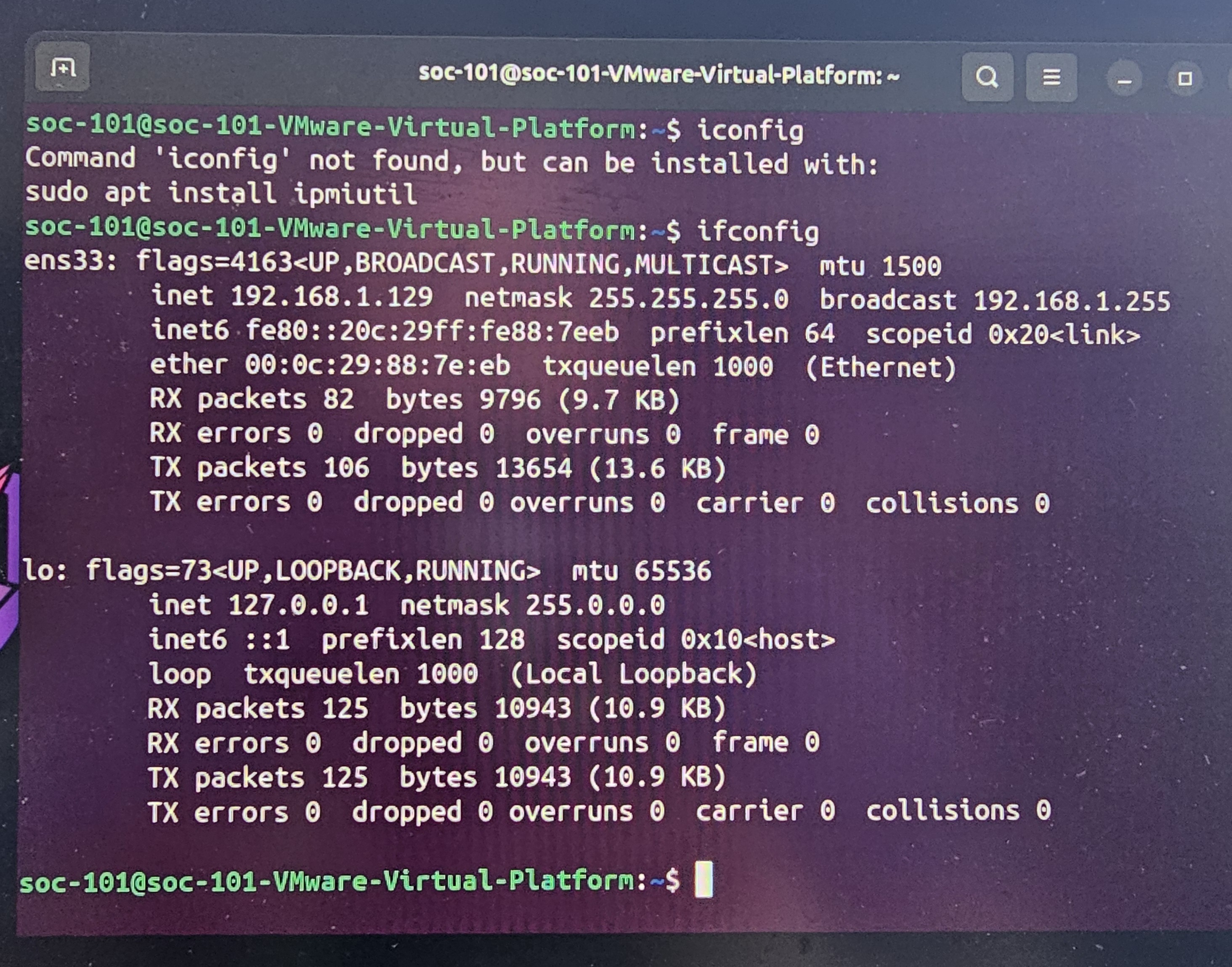
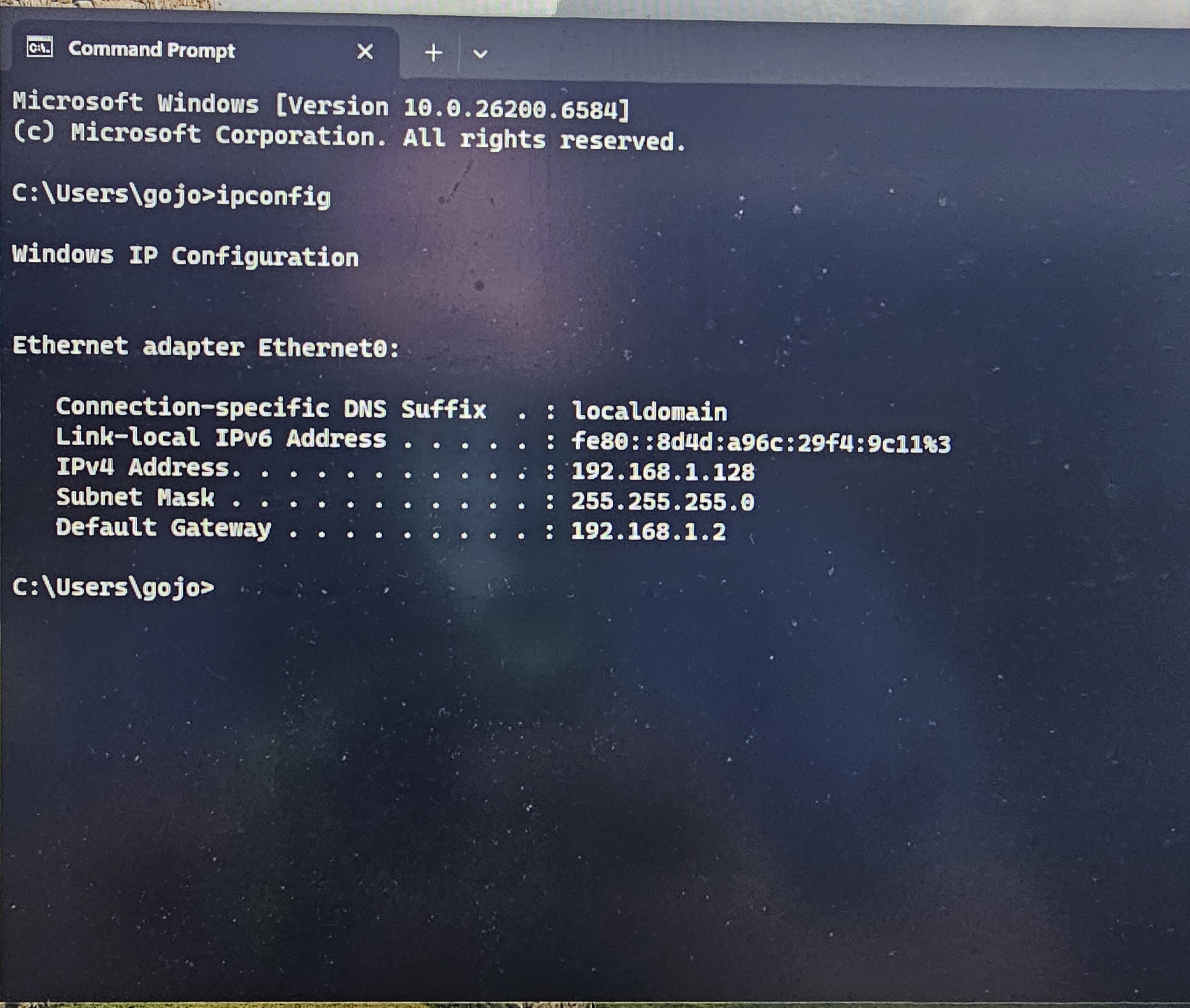
Guest Adapter Binding: Modified the hardware layout configuration files for the
Windows 11 SOC_101andUbuntu 64-bittarget endpoints, binding their virtual interfaces directly to the customVMnet8switch.
Technical Reference Evidence
Technical Projects & Lab Operations
Production infrastructure deployment, enterprise threat monitoring, and blue team lab operations.
Production Web Infrastructure & Architecture Migration
Live Commercial AssetManaged the full-lifecycle migration of a production commercial automotive services platform from a legacy hosting provider to a highly optimized, serverless cloud pipeline. Focused on minimizing server-side attack surfaces, enforcing strict data-in-transit encryption protocols, and setting up automated deployment guardrails.
Technical Toolset & Infrastructure Stack:
Cloudflare DNS Cloudflare Pages Web Application Firewall (WAF) SSL/TLS Optimization GitHub Enterprise Actions (CI/CD) Bootstrap 5Technical Core Accomplishments & Defensive Controls:
- Attack Surface Reduction: Deployed a modern, serverless architecture utilizing Cloudflare Pages, eliminating server-side operating system vulnerabilities and hosting execution risks.
- Edge Security Integration: Enforced strict proxy routing through Cloudflare, leveraging its built-in Web Application Firewall (WAF) configurations and automated DDoS mitigation layers.
- Data-in-Transit Enforcement: Configured edge certificates to enforce strict SSL/TLS encryption mechanisms, mitigating risks associated with traffic interception and cleartext data sniffing.
- CI/CD Pipeline Auditing: Structured a secure code deployment pipeline using GitHub, enforcing strict branch protection and access controls so all infrastructure updates are fully tracked, version-controlled, and audited.
OpSec Notice: To maintain strict operational security and protect the client asset from public reconnaissance or threat mapping, the raw code repository remains private. Verified technical reviewers can request audited access credentials.
Request Repository AccessSecurity Operations Center (SOC) Deployment & Alert Triage Lab
Active Technical LabEngineered a fully functional, isolated Security Operations Center (SOC) training laboratory designed to simulate modern enterprise environments. Focused on active network logging, configuring data ingestion points, analyzing system telemetry, and running incident response plays against active attack frameworks.
Security Stack & Lab Tools:
Splunk Enterprise SPL (Search Processing Language) Linux (Ubuntu/Kali) Windows 11 & Sysmon VMware Workstation Pro MITRE ATT&CK FrameworkTechnical Core Accomplishments & Defensive Controls:
- Virtualized Network Isolation: Designed an isolated host-only subnet (192.168.1.0/24) via VMware Workstation Pro to securely run active telemetry gathering without risk to production networks.
- SIEM Configuration & Log Ingestion: Built a centralized Splunk Enterprise server hosted on Ubuntu Linux, configuring data inputs to ingest live host telemetry, application logs, and system events.
- Telemetry & Event Correlation: Implemented advanced logging policies across Windows endpoints using Microsoft Sysmon, tracking process creations, network connections, and registry anomalies.
- Alert Triage & Incident Handling: Formulated custom Splunk queries using Search Processing Language (SPL) to build operational dashboards, identify potential brute-force or persistence vectors, and map adversarial behavior back to the MITRE ATT&CK framework.
Lab Deliverables: Read full operational write-ups, custom threat hunting SPL scripts, and analytical lab log documentation.
View Active Lab Logs